AI coding agents can now produce complete patches, suggest pull request changes, run tests in configured environments, and leave review comments inside familiar development tools. That is convenient, but it also changes the learner's job. The important question is no longer only "can AI write code?" It is "how should I review code that arrived faster than I could have written it myself?"
The scenario is deliberately ordinary: an AI coding agent has changed a small project and proposes a patch. Before running its commands or merging the result, I want a review pass that is fast enough to use every time and strict enough to catch dangerous mistakes. This is not about distrusting every generated line. It is about slowing down at the points where a patch can change files, install packages, expose secrets, or hide a behavior change behind fluent explanation.
Start with the stated intent
The first review question is simple: did the patch solve the task that was actually requested? AI coding tools often provide a natural-language summary before or after a diff. Treat that summary as a claim, not as proof. Read the changed files and ask whether each change connects to the original request.
OpenAI's Codex introduction emphasizes that users can inspect work through citations, terminal logs, and test outputs, and that manual review remains essential before integration and execution. That is the right mental model for everyday learners. The agent's explanation is a map of what it thinks it did. The diff is the evidence.
A practical first pass is to write one sentence in your own words: "This patch should change only X, because the task was Y." If the diff touches unrelated files, changes configuration, alters dependencies, or rewrites large sections without a clear reason, pause before running anything.
Separate reading from execution
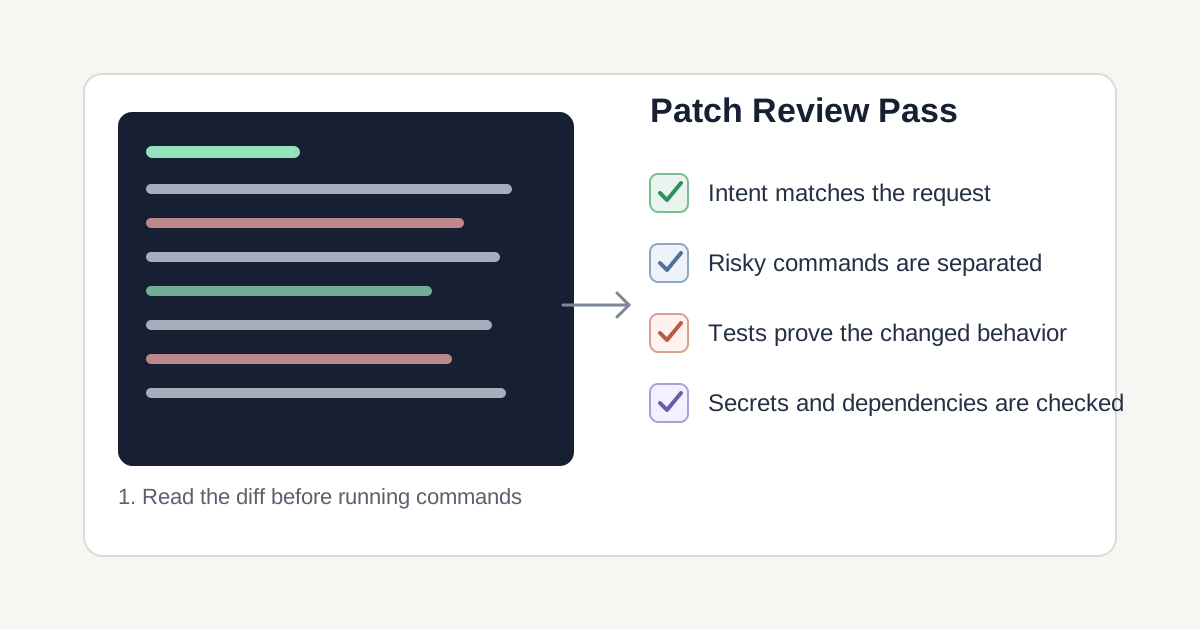
Many mistakes happen because review and execution are mixed together. A user sees a confident explanation, runs the suggested command, and only later checks what changed. Reverse that order. Read the file list first, then inspect the diff, then decide which commands are safe to run.
This matters because coding agents may suggest package installs, migrations, file moves, build steps, or cleanup commands. Some are harmless. Others can delete local work, update lockfiles, change generated assets, or run scripts from dependencies. OWASP's LLM Top 10 names insecure output handling, excessive agency, and overreliance as separate risks. For a developer, that means an AI answer should not flow directly into shell execution without a boundary.
Keep a simple rule: commands that only read state are lower risk than commands that write state. A command that prints a diff is different from a command that modifies files. A test command is different from a migration command. A package install is different from opening a source file.
Ask for a review trail before the patch
A weak prompt is: "Fix this bug and run whatever tests are needed." That prompt may be acceptable in a sandbox, but it gives the agent too much discretion if you are learning, reviewing, or working in a repository with real data.
A stronger prompt is: "Propose a minimal patch for this bug. Before editing, list the files you expect to touch and why. After editing, show the diff summary, any commands you want to run, whether each command reads or writes state, and which test proves the changed behavior. Do not install dependencies or run migrations unless I approve them separately."
The expected output changes because the agent now has to expose its plan, separate commands by risk, and connect tests to behavior. The patch may still be wrong, but it is easier to review. You are not asking the model to be perfect. You are asking it to leave a trail that a human can inspect.
- Weak prompt: delegates the fix and execution in one broad instruction.
- Improved prompt: asks for expected files, command risk, and behavior-specific tests.
- Expected result: a patch that arrives with review evidence instead of only a confident summary.
Three patch failures I check first
The first failure is scope creep. A small bug fix quietly becomes a refactor, style cleanup, dependency update, or architecture change. Scope creep is not always malicious. It can happen because the model tries to make the surrounding code look more consistent. The review question is whether those extra edits help the requested task enough to justify the risk.
The second failure is false test confidence. A test suite can pass while the important behavior remains untested. A generated test can also mirror the implementation rather than checking the user-visible outcome. Ask which failing case existed before the patch and which assertion proves that it now works.
The third failure is hidden execution risk. A patch may add a new script, change a package file, alter environment handling, or introduce a dependency that will run later. OWASP's supply chain and insecure output handling categories are useful reminders here: code that looks ordinary can still affect what runs downstream.
My pre-run checklist
I would begin with a clean working tree or a separate branch. Then I would read the file list before reading the detailed diff. If the file list includes generated output, lockfiles, environment files, build configuration, or migration files, I would review those changes before touching application code.
Next, I would classify commands into three groups: safe inspection, normal validation, and approval-required execution. Safe inspection includes status, diff, and file listing commands. Normal validation includes project tests, lint, type checks, and local builds when they do not require secrets. Approval-required execution includes package installation, database migrations, deployment commands, credential changes, recursive deletion, and scripts whose contents I have not read.
Finally, I compare the patch against the user-facing behavior. GitHub's Copilot code review documentation is a useful example of tool-assisted review staying inside a human review process: Copilot can comment and suggest changes, but its comments do not count as required approval. I keep that principle. AI can help find issues and produce changes, but the final decision should rest on diff review, tests, and an understanding of the task.
Continue learning on JoyfulGrid
Frequently asked questions
Should I run commands suggested by an AI coding agent?
Not automatically. Read the command first, decide whether it reads or writes state, and check whether it can affect files, dependencies, credentials, databases, or deployments.
Is a passing test suite enough to trust an AI-generated patch?
No. Passing tests are useful evidence, but you still need to confirm that the tests cover the changed behavior and that the diff stayed within the requested scope.
What is the fastest first check for an AI code patch?
Check the file list. Unexpected dependency files, environment files, build scripts, migrations, or large unrelated edits deserve review before running commands.
Can AI code review replace human review?
No. AI review can add signal, suggest fixes, and catch patterns, but humans still need to decide whether the change matches the intent, risk level, and project standards.
Sources
- Introducing CodexOpenAI
Used for Codex workflow details, evidence through logs and test outputs, manual review guidance, and secure execution context.
- Codex CLIChatGPT Learn
Used for current Codex CLI context and the idea that coding agents can read, edit, and run code under different approval modes.
- Using GitHub Copilot code reviewGitHub Docs
Used for Copilot review behavior, suggested changes, custom instructions, and the distinction between AI comments and required approval.
- Top 10 for Large Language Model ApplicationsOWASP Foundation
Used for risk framing around prompt injection, insecure output handling, supply chain vulnerabilities, excessive agency, and overreliance.
- AI Risk Management FrameworkNIST
Used for the general risk-management framing behind identifying, evaluating, and controlling AI-related workflow risks.