
AI assistants are becoming more personal. They can remember preferences, infer context from past chats, use saved instructions, and in some products draw on files or connected apps. That can save time. It can also make an answer feel accurate because it matches your habits, even when the remembered detail is old, incomplete, or too private for the current task.
Here is the scenario I use for a memory audit: after several weeks of planning study sessions, drafting emails, organizing projects, and asking personal questions, I stop before trusting the next personalized answer. I want to know which details the assistant is carrying forward, which details are no longer true, and which details should be asked again each time.
Know the difference between memory and chat history
A memory feature is not always a single list of facts. OpenAI's Memory FAQ explains that ChatGPT can use saved memories and, when enabled, relevant past chats to personalize future responses. It also notes that the memory summary may not include every factor that shaped a response. That distinction matters because deleting one saved memory may not fully remove a detail if the same information remains in older chats, files, or connected apps.
Google's Gemini personalization help describes personalization based on past Gemini chats, connected Google apps, and response preferences, while Microsoft Copilot documentation separates conversation history, personalization, memory, model training, and advertising controls. The practical lesson is that each assistant has its own settings model. Do not assume that one toggle controls every form of context.
For a learner, the safest first step is to make a simple inventory: saved memories, past chat references, custom instructions, connected apps, uploaded files, and model-training controls. These are related, but they are not the same.
Decide what belongs in long-term context
Long-term memory is best for stable preferences that improve many future answers. Examples include a preferred explanation style, a recurring study goal, a language level, a formatting preference, or a project role that will remain true for months. These details reduce repetition without exposing much risk.
Temporary facts are different. A deadline, travel plan, client situation, health worry, job search, or short-term project detail may help one conversation but become misleading later. If a chatbot keeps using those details, it can personalize the wrong answer. It may recommend a study plan around an old exam, assume a project is still active, or reuse context from a private conversation where it does not belong.
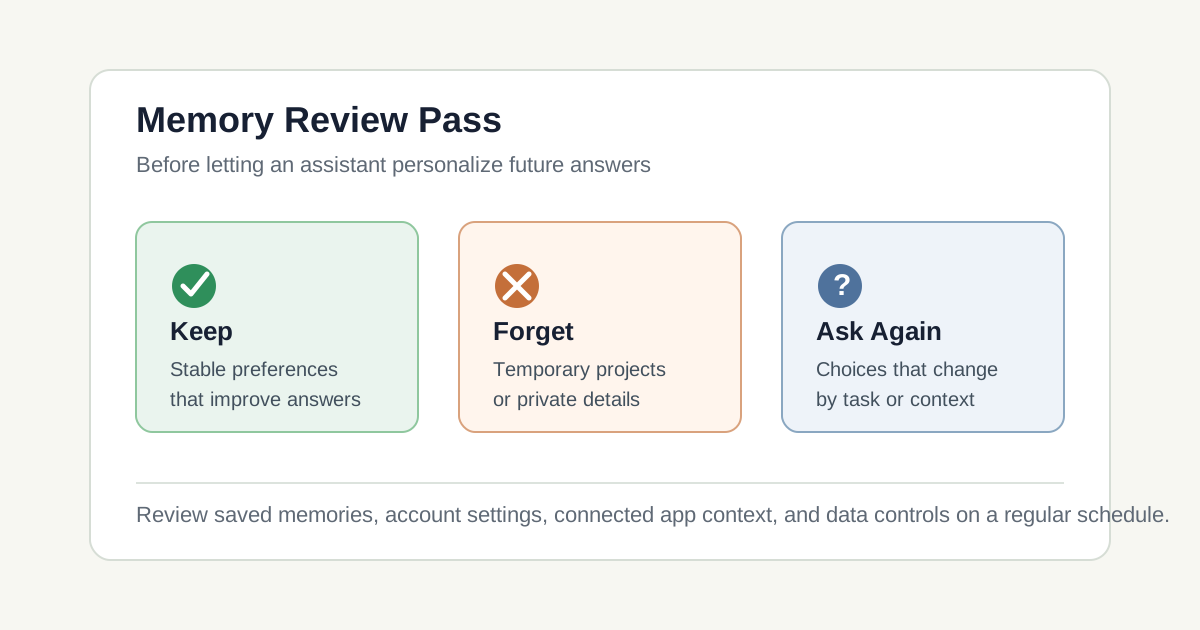
Use three labels: keep, forget, and ask again. Keep stable preferences. Forget sensitive or expired details. Ask again for anything that changes by task, mood, location, account, or audience.
Run a keep, forget, ask-again audit
A weak prompt is: "Remember everything important about how I work." That sounds efficient, but it gives the assistant too much room to decide what matters. It may preserve details that are convenient in one workflow and intrusive in another.
A stronger prompt is: "Review what you remember about my learning and work preferences. Sort each item into keep, forget, or ask again. Keep only stable preferences that help future explanations. Mark personal, sensitive, temporary, or project-specific details for deletion unless I explicitly approve them."
The expected output changes because the assistant now has to classify memories instead of simply collecting them. You get a review table, not a larger pile of personalization. After that table, open the product's actual memory settings and delete or edit the items yourself where the product allows it.
- Weak prompt: asks the assistant to remember broadly.
- Improved prompt: asks for keep, forget, and ask-again categories.
- Expected result: a smaller memory set that supports future work without carrying stale context.
Where personalization misleads the reader
The first failure is stale personalization. A chatbot remembers a preference that was true last month and keeps applying it after your work changes. This can be subtle because the answer feels tailored. The problem is not that the model ignored you. The problem is that it remembered an old version of the situation.
The second failure is context crossing. A detail shared for one purpose appears in another setting. OpenAI's Memory FAQ explains that fully removing something may require deleting it from each place it appears, including chats, files, memory summaries, or connected apps. Google's connected-app documentation also warns that connected data can include sensitive or confidential information. That makes source control important: where did this personalization come from?
The third failure is confusing privacy controls with training controls. Turning off model training is not the same as deleting a memory. Turning off memory is not always the same as deleting old chats. Each product names these controls differently, so the review must use the current help page for the exact account and plan.
My monthly review record
On August 2, 2026, I used this review pattern as a checklist rather than as a claim that one product behaves like another. The first step is to ask the assistant what it remembers or what context it is using. The second step is to check the official settings page instead of relying only on the assistant's answer. For ChatGPT, that means reviewing Memory and Data Controls. For Gemini, that means checking personalization and connected-app settings. For Copilot, that means checking memory, personalization, conversation history, and model-training controls for the account type in use.
Next, I would test one new conversation after editing memory. I would ask a neutral question where the old memory would normally affect the answer. If the assistant still uses the old detail, I would look for another source: an older chat, a custom instruction, a connected app, or a file library. The verification question should be boring and specific, because the goal is to test memory behavior rather than generate a polished answer.
My rule after the review is narrow: memory is helpful only when it stays small, current, and appropriate. A monthly memory review is enough for most learners. Keep stable preferences, delete expired details, and make the assistant ask again when the context should not be assumed.
Continue learning on JoyfulGrid
Frequently asked questions
Should I turn AI memory off completely?
Not always. Memory can help with stable preferences and recurring learning goals. The safer habit is to review what is remembered and remove details that are sensitive, temporary, or no longer accurate.
Does deleting a chat delete everything the assistant remembers?
Not necessarily. Some products separate saved memories, chat history, files, connected apps, and account settings. Check the current help page for the exact tool you use.
What should an AI assistant remember about me?
Prefer stable, low-risk details: explanation level, formatting preferences, recurring study goals, and accessibility needs. Avoid storing private, sensitive, or temporary details unless there is a clear reason.
How often should I review AI memory settings?
A monthly review is reasonable for regular users. Review sooner after a major project, job change, school change, sensitive conversation, or when answers start assuming old context.
Sources
- Memory FAQOpenAI Help Center
Used for current ChatGPT memory behavior, saved memories, reference chat history, memory sources, deletion guidance, and connected app context.
- Data Controls FAQOpenAI Help Center
Used for the distinction between memory, temporary chats, and model-training controls.
- Get personalization in Gemini AppsGoogle Gemini Apps Help
Used for Gemini personalization based on past chats, connected apps, and response preferences.
- About personalization with Connected AppsGoogle Gemini Apps Help
Used for connected-app personalization, data categories, and privacy cautions around connected Google apps.
- Microsoft Copilot privacy controlsMicrosoft Support
Used for Copilot memory, personalization, model-training controls, and ways to manage what Copilot remembers.